Installing InfoScan Poll
About the InfoScan Poll program
InfoScan Poll fetches TIFF files from the folder(s) to which the scanning clients scan. From InfoScan Poll the files are taken to WorkZone Content Server XdiDataConsumer and then transferred to WorkZone Content Server.
Scanning to WorkZone Content Server is not possible, if the program InfoScan Poll is not running. The program can be started by means of the ispoll.exe file. You can make a shortcut to this file and copy it to the desktop. However, the most common is the run the program as a Windows service on the server.
Install InfoScan Poll as a Windows service
- Double-click the
ispollserviceinstall.exefile in the folderC:\Program Files\InfoScan.
The InfoScan Poll Service Install window appears. - Click Install Service.
The InfoScan Poll Service Install window closes, and the service is installed. - Select Start > Settings > Control Panel > Administrative Tools > Services.
The Services window appears. - In the Name column, select .InfoScan Poll.
- Configure the service to start automatically and to log on as a user, who has privileges to access all folders used by the CFG files, which are used by the program InfoScan Poll.
- Check that the service has started.
The InfoScan Poll window
When the InfoScan Poll program runs, the InfoScan Poll window is displayed:
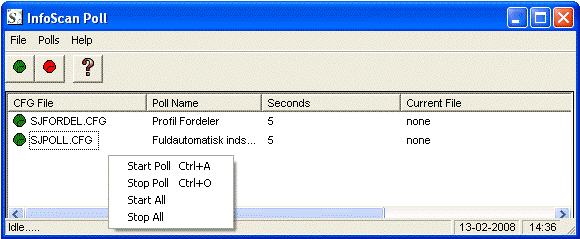
In the InfoScan Poll window, you can read the status of the program. Each line in the window represents one polling according to the rules in one CFG file. If a line begins with a green icon, it signifies that the polling is running. A red icon signifies that the polling is not running.
Polling can be started and stopped through the pop-up menu, which appears when you right-click on a line in the window.
Troubleshooting
If a polling cannot be started (and shows a red icon), an error message is shown in the Status column in the InfoScan Poll window. A detailed error message appears, when you double-click on the line with the defective polling.
The most common errors are:
 Error: 10000 Poll index folder does not exist
This error means that the program InfoScan Poll cannot find the folder from which the files must be fetched. If the InfoScan Poll program runs as a Windows service, this error can occur, if the service is not configured correctly. The service has to log on as a domain user with privileges to access the folders used by the program.
Error: 30002 File not found
This error means that the program InfoScan Poll cannot find the CFG file referred to in ispoll.ini.